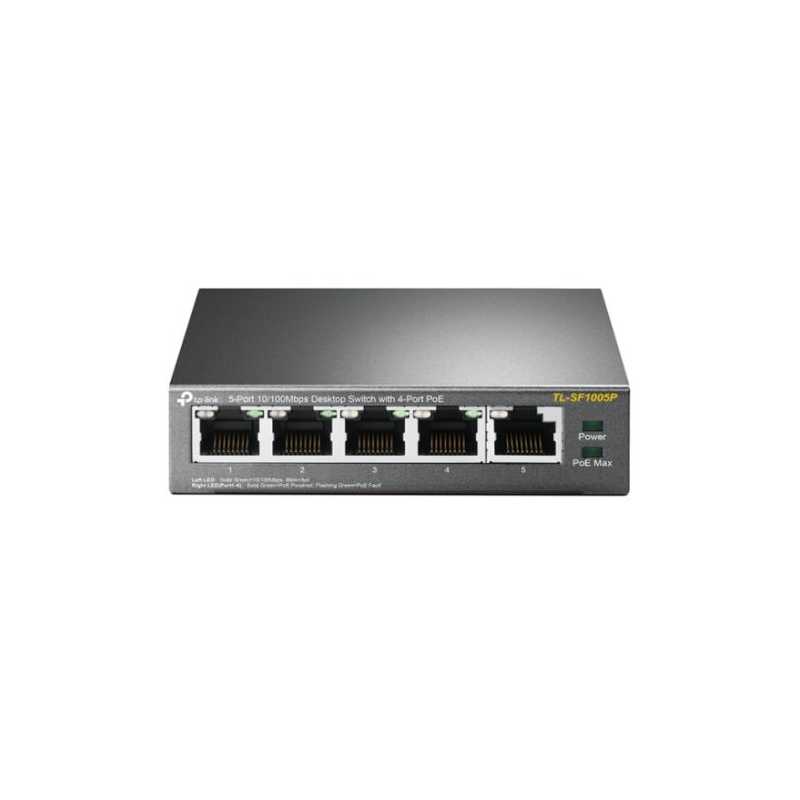
TP-Link TL-SF1005P 5-Port 10/100Mbps Metal Desktop PoE Switch with 4-Port PoE (58W)
£33.62
VAT included
Stock status: Out of stock
Out of stock
5-Port 10/100Mbps Desktop Switch with 4-Port PoE
5 10/100Mbps RJ45 ports
With four PoE ports, transfers data and power on one single cable
Working with IEEE 802.3af compliant PDs, expands home and office network
Supports PoE Power up to 15.4W for each PoE port
Supports PoE Power up to 58W for all PoE ports
Requires no configuration and installation
What This Product Does
TL-SF1005P is a 5 10/100Mbps ports unmanaged switch that requires no configuration and provides 4 PoE (Power over Ethernet) ports. It can automatically detect and supply power with all IEEE 802.3af compliant Powered Devices (PDs). In this situation, the electrical power is transmitted along with data in one single cable allowing you to expand your network to where there are no power lines or outlets, where you wish to fix devices such as APs, IP Cameras or IP Phones, etc.
Power over Ethernet
4 of the 5 Auto-Negotiation RJ45 ports (Port 1 to Port 4) of the switch support Power over Ethernet (PoE) function. These PoE ports can automatically detect and supply power with those IEEE 802.3af compliant Powered Devices (PDs).
Overload Arrangement
TL-SF1005P has the priority function which will help protect the system when the system power is overloaded. If all PoE PDs power consumption is >= 58W, a priority will be arranged among the PoE ports, then the system will cut off the power of the lowest-priority port.
Port Priority Function
Priority (port-1=port-2=port-3>port-4): This function will help to ensure the normal operation of the system, it means Port 4 will be cut off when all total PoE PDs power consumption exceed 58W. For an example, Port 1, 2 and 4 is using 15.4W (maximum power for per port is 15.4W); the system power is 46.2W in total. If there is an additional PD inserted to Port 3 with 12W, and then the system will cut off the power of Port 4 because of the overloaded power, this means Port 1, 2 will use 15.4W, and Port3 will use 12W, no power will be supplied to Port 4.
Easy To Use
TL-SF1005P is easy to install and use. It requires no configuration and installation. With desktop design, outstanding performance and quality, the TP-Link’s TL-SF1005P 5-Port 10/100Mbps Desktop Switch with 4-Port PoE is an ideal choice for expanding your home or office network.
Professional Fast Ethernet Switch with 4 PoE Ports Plug and Play, with PoE Transmission for Surveillance up to 250 m
Dedicated 4-Port PoE Switch (41 W Budget) for Numerous Applications Compliance with the 802.3af PoE standard supports up to 15.4 W on each PoE port. The total 41 W PoE power budget for the 4x PoE ports opens up a wide range of applications, such as surveillance for offices, dormitories, and small businesses. It is fully compatible with IP cameras, access points, IP phones, computers, printers, and more.
Ideal for IP Surveillance, Up to 250 m Transmissions With extend mode, the PoE transmission distance reaches up to 250 m, perfect for IP Camera deployment in large areas.
Specifications
HARDWARE FEATURES
Interface 5x 10/100 Mbps RJ45 Ports (Ports 1–4 support 802.3af PoE) AUTO Negotiation AUTO MDI/MDIX
External Power Supply External Power Adapter (Output: 53.5 V DC / 0.81 A)
Packet Forwarding Rate 0.744 Mpps
PoE Ports (RJ45) Standard: 802.3 af compliant PoE Ports: Ports 1–4 Power Supply: 41 W
Mac Address Table 2K
Jumbo Frame 2 KB
Switching Capacity 1 Gbps
Dimensions ( W x D x H ) 3.9 x 3.9 x 1.0 in (100 x 98 x 25 mm)
Max Power Consumption 1.9 W (220 V / 50 Hz, no PD connected) 47 W (220 V / 50 Hz, with 41 W PD connected)
Max Heat Dissipation 6.48 BTU/h(no PD connected) 160.27 BTU/h(with 41 W PD connected)
SOFTWARE FEATURES
Transmission Method Store-And-Forward
Advanced Functions Compatible With IEEE 802.3af/at Compliant PDs Extend Mode Button (Ports 1–4) Priority Mode Button (Ports 1–2) Mac Address Auto-Learning And Auto-Aging IEEE802.3x Flow Control For Full-Duplex Mode and Backpressure for Half-Duplex Mode
OTHERS
Certification FCC, CE, RoHS
Package Contents TL-SF1005LP Power Adapter Installation Guide
Compatible With IEEE 802.3af Compliant PDsPriority FunctionMac Address Auto-Learning And Auto-AgingIEEE802.3x Flow Control For Full-Duplex Mode And Backpressure For Half-Duplex Mode
Transfer Method
Store-And-Forward
Mac Address Table
2K
POE
Yes
RJ45 Data Transfer Rate
10/100 Mbps
Managed/Unmanaged
Unmanaged
PoE capable
Yes
Comments (0)
No customer reviews for the moment.
Your review appreciation cannot be sent
Report comment
Are you sure that you want to report this comment?
Report sent
Your report has been submitted and will be considered by a moderator.
Your report cannot be sent
Write your review
Review sent
Your comment has been submitted and will be available once approved by a moderator.
Your review cannot be sent
5-Port 10/100Mbps Desktop Switch with 4-Port PoE
5 10/100Mbps RJ45 ports
With four PoE ports, transfers data and power on one single cable
Working with IEEE 802.3af compliant PDs, expands home and office network
Supports PoE Power up to 15.4W for each PoE port
Supports PoE Power up to 58W for all PoE ports
Requires no configuration and installation
What This Product Does
TL-SF1005P is a 5 10/100Mbps ports unmanaged switch that requires no configuration and provides 4 PoE (Power over Ethernet) ports. It can automatically detect and supply power with all IEEE 802.3af compliant Powered Devices (PDs). In this situation, the electrical power is transmitted along with data in one single cable allowing you to expand your network to where there are no power lines or outlets, where you wish to fix devices such as APs, IP Cameras or IP Phones, etc.
Power over Ethernet
4 of the 5 Auto-Negotiation RJ45 ports (Port 1 to Port 4) of the switch support Power over Ethernet (PoE) function. These PoE ports can automatically detect and supply power with those IEEE 802.3af compliant Powered Devices (PDs).
Overload Arrangement
TL-SF1005P has the priority function which will help protect the system when the system power is overloaded. If all PoE PDs power consumption is >= 58W, a priority will be arranged among the PoE ports, then the system will cut off the power of the lowest-priority port.
Port Priority Function
Priority (port-1=port-2=port-3>port-4): This function will help to ensure the normal operation of the system, it means Port 4 will be cut off when all total PoE PDs power consumption exceed 58W. For an example, Port 1, 2 and 4 is using 15.4W (maximum power for per port is 15.4W); the system power is 46.2W in total. If there is an additional PD inserted to Port 3 with 12W, and then the system will cut off the power of Port 4 because of the overloaded power, this means Port 1, 2 will use 15.4W, and Port3 will use 12W, no power will be supplied to Port 4.
Easy To Use
TL-SF1005P is easy to install and use. It requires no configuration and installation. With desktop design, outstanding performance and quality, the TP-Link’s TL-SF1005P 5-Port 10/100Mbps Desktop Switch with 4-Port PoE is an ideal choice for expanding your home or office network.